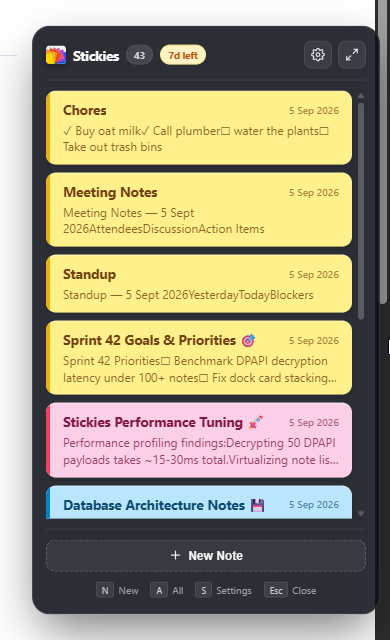
The Side-by-Side Breakdown
Quick capture tools should have zero friction. When you look at how Windows Sticky Notes handles daily tasks compared to stickies.lol, the architectural and design differences become immediately clear:
| Feature | Windows Sticky Notes | stickies.lol |
|---|---|---|
| Screen Placement | Floating independent windows only | Edge-docked pill, fans out on hover |
| Markdown Support | ❌ None (basic rich-text buttons only) | ✅ Full markdown & keyboard shortcuts |
| Slash Commands | ❌ Not supported | ✅ /standup, /calc, /clean, /meeting, etc. |
| Inline Math Calculations | ❌ None (requires external calculator) | ✅ Interactive /calc cards evaluated live |
| Data Encryption | Basic unencrypted local SQLite / MS Cloud | 🔒 Windows DPAPI hardware-level AES |
| Offline Reliability | ✅ Works offline (syncs if logged in) | ✅ 100% offline (zero cloud dependency) |
| Idle Memory (RAM) | ~60 MB to 100 MB | < 20 MB (Native Rust + WebView2) |
| Pricing | Free (included with Windows) | $4.99 one-time (7-day free trial) |
| Telemetry & Tracking | Microsoft telemetry & diagnostics active | ❌ Zero telemetry, zero analytics SDKs |
When Windows Sticky Notes Is Enough
To be fair to Microsoft, the default Windows Sticky Notes app has its place. It might be all you need if:
- You only maintain 1 or 2 static notes: If you just need to leave a single Wi-Fi password or phone extension pinned to your secondary monitor indefinitely, the default app does the job.
- You do not mind window clutter: If your workflow does not involve frequently switching between multiple IDEs, terminals, and design tools, having three floating yellow rectangles across your desktop might not bother you.
- You only need unformatted plain text: If you never write checklists, markdown tables, headings, code snippets, or quick arithmetic, formatting shortcuts are unnecessary.
- You want zero setup: It is pre-installed in your Windows 11 Start menu and ready to launch without downloading anything.
When stickies.lol Makes Sense
If your desktop is an active workspace where focus and speed matter, stickies.lol was engineered specifically to fix the annoyances of floating notes:
Accessible in a Flash, Invisible Until Reached
Unlike traditional notes that cover your active workspace, stickies.lol sleeps as an unobtrusive 12pt pill docked directly against the right screen boundary. Move your mouse to the edge, and your notes gracefully fan out in 45ms. Press Esc, and they tuck back into the margin.
1. Keyboard-Centric Velocity
With Windows Sticky Notes, applying formatting requires moving your hand to the mouse, highlighting text, and hunting for tiny toolbar buttons. In stickies.lol, your hands never leave the home row:
- Type / to summon the autocomplete command palette.
- Type
/standupto scaffold your agile daily standup update in one tap. - Type
/calc (140 * 12) + 85to calculate values inline without context-switching to a calculator app. - Type
/cleanto purge all checked tasks once your sprint tasks are done.
2. True Hardware-Tied Privacy
Default Windows Sticky Notes links notes to your Microsoft Account and syncs them through Exchange / Outlook servers. If your corporate account enforces cloud retention policies, your quick thoughts are stored in Microsoft's cloud infrastructure.
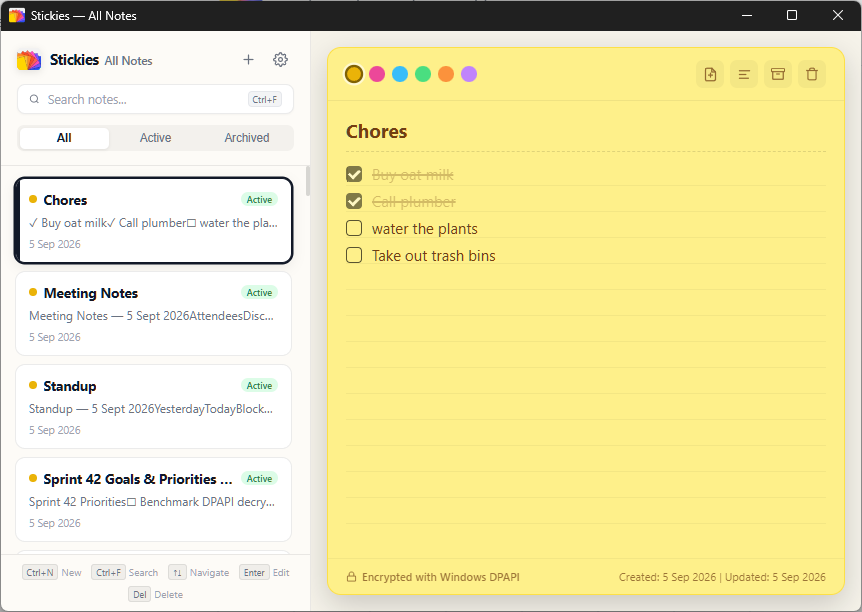
stickies.lol stores everything in a local SQLite database secured with Windows Data Protection API (DPAPI) hardware encryption. Your keys are derived from your Windows logon session. There are zero background analytics, zero telemetry pings, and zero external servers.
3. Lightweight System Footprint
Windows Sticky Notes runs on modern Windows as a packaged UWP / WebView container that consumes 60MB to 100MB of RAM.
stickies.lol is written in compiled Rust on top of Tauri v2, running at under 20MB of RAM. It loads instantly on system startup without adding boot lag.
Upgrade Your Desktop Note-Taking
Try stickies.lol free for 7 days. One-time purchase of $4.99. No subscription, no account, and no cloud.